Arabic · Kurdish · English — in your customers' dialect
An AI employee that answers your customers on every channel
Mujib learns your business — your prices, your services, the way you work — and answers on WhatsApp, Instagram, Messenger, Telegram, your website, your app and the phone. When a customer needs a person, your team takes over from one inbox.
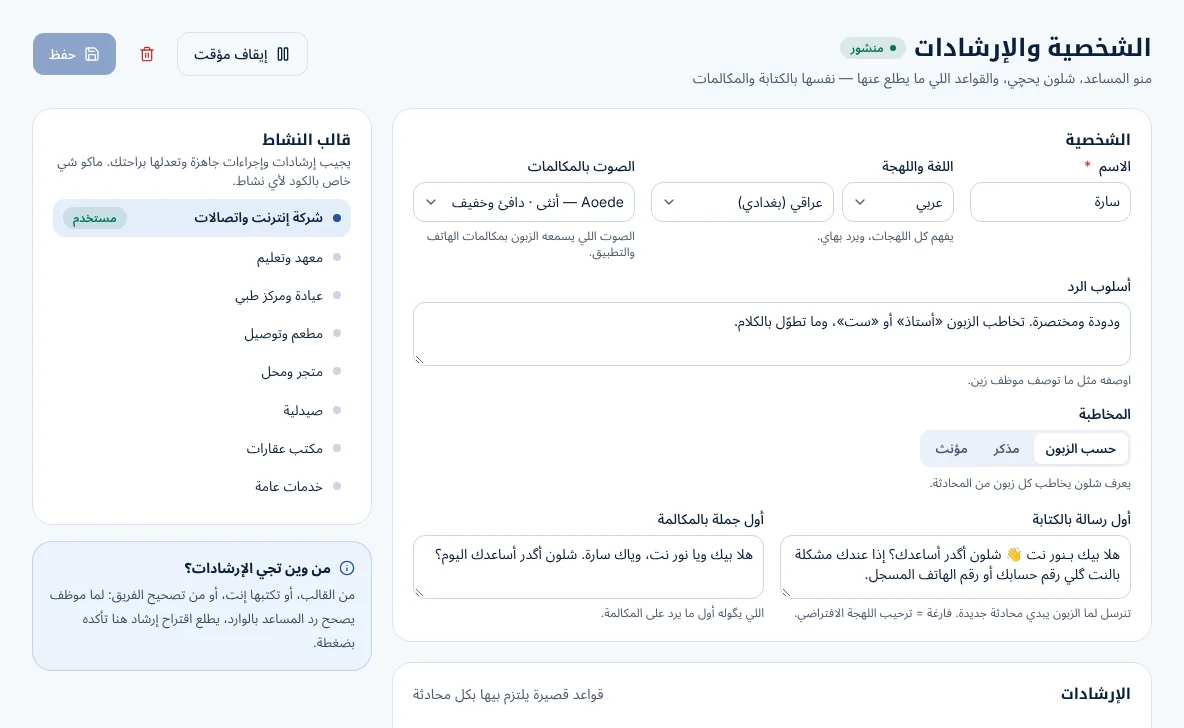
Start from a ready template for your activity, then change anything. There is no special code for any trade — it is your guidance, your tables and your tools.
Internet providers
Checks a subscriber's line, explains an outage in their area honestly, and books a technician visit.
Institutes
Answers about courses, start dates, prices and seats left, and registers a student.
Clinics
Shares doctors' days and visit prices, books an appointment, and hands medical questions to your staff.
Restaurants
Shows today's menu with photos and prices, takes a delivery order, and passes it to the kitchen.
Shops
Finds a product, sends its photo and price, and says whether it is in stock right now.
Pharmacies
Checks whether a medicine is available and passes prescriptions to a pharmacist.
Real-estate offices
Shares listings with photos, answers the details, and books a viewing.
Services
Takes a request with the address and a good time, and records a follow-up for your team.
What makes it work
Every setting says why it is there, in plain words. Nothing technical unless you ask for it.
Channels
Wherever your customers already are
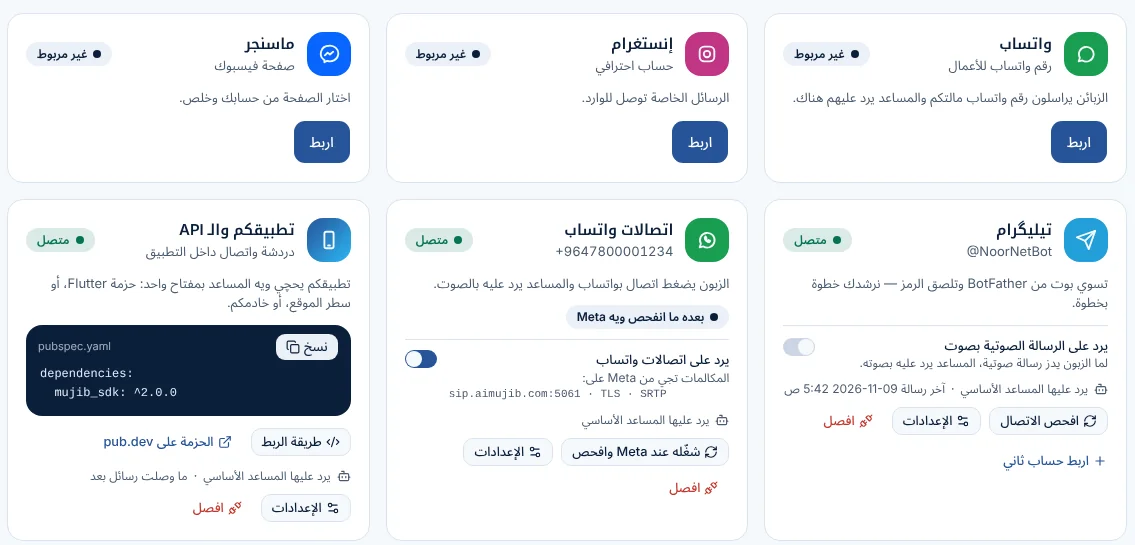
Connect WhatsApp, Instagram, Messenger and Telegram, put the chat on your website, or add it to your own app with the SDK. One assistant answers everywhere, by text and voice notes, in your customers' dialect.
Voice notes understood in the customer's dialect
Photos sent and received
Your own app through the SDK and API, with the customer's details passed along
Live data
Prices that change, with photos
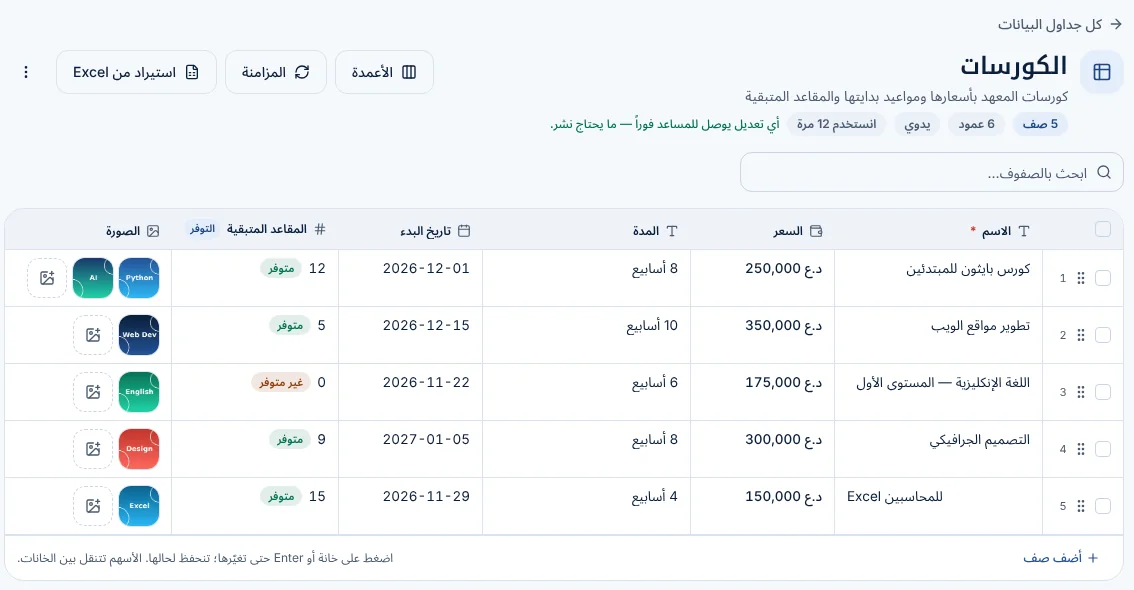
Keep your courses, products, packages or menu in a simple table — with a photo for each row. When a price or availability changes, the assistant answers with the new one at once.
Edit rows like a spreadsheet, or import Excel / CSV
Sync from a Google Sheet or your API every few minutes
It never makes up a price: numbers must come from your tables or tools
Tools
Acts on your systems — and knows when
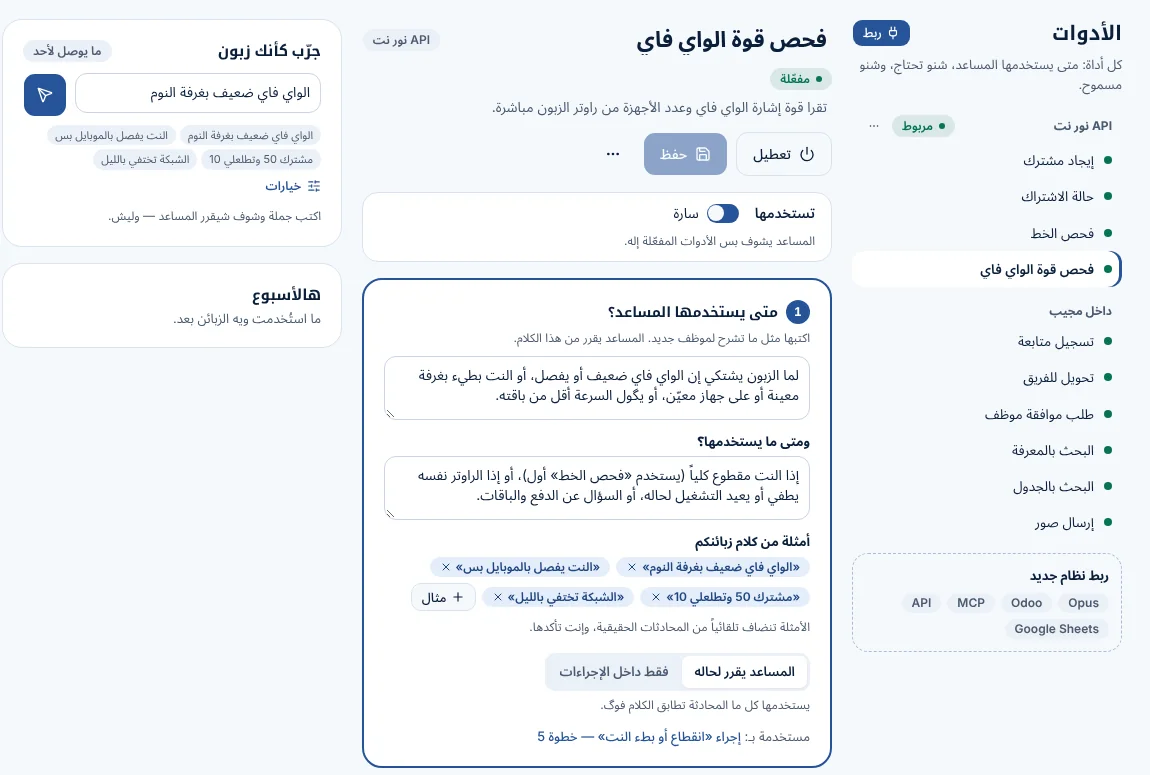
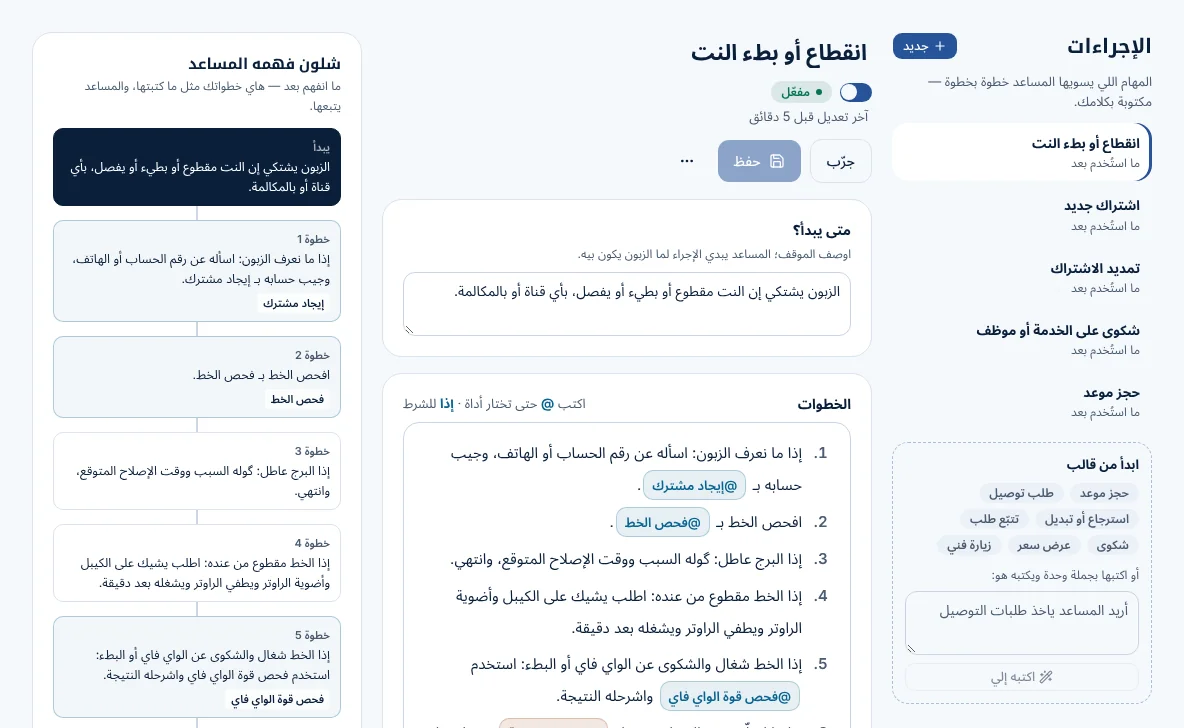
Connect Opus ERP, Odoo, any MCP server or any HTTP API. You write when each tool should be used, in plain words, and choose its permission.
Runs by itself, asks the customer to confirm first, or waits for a teammate's approval
Fills inputs from what it already knows before asking
Every call is traced: what it sent, what came back, and why it chose it
Team inbox
Your team works beside it
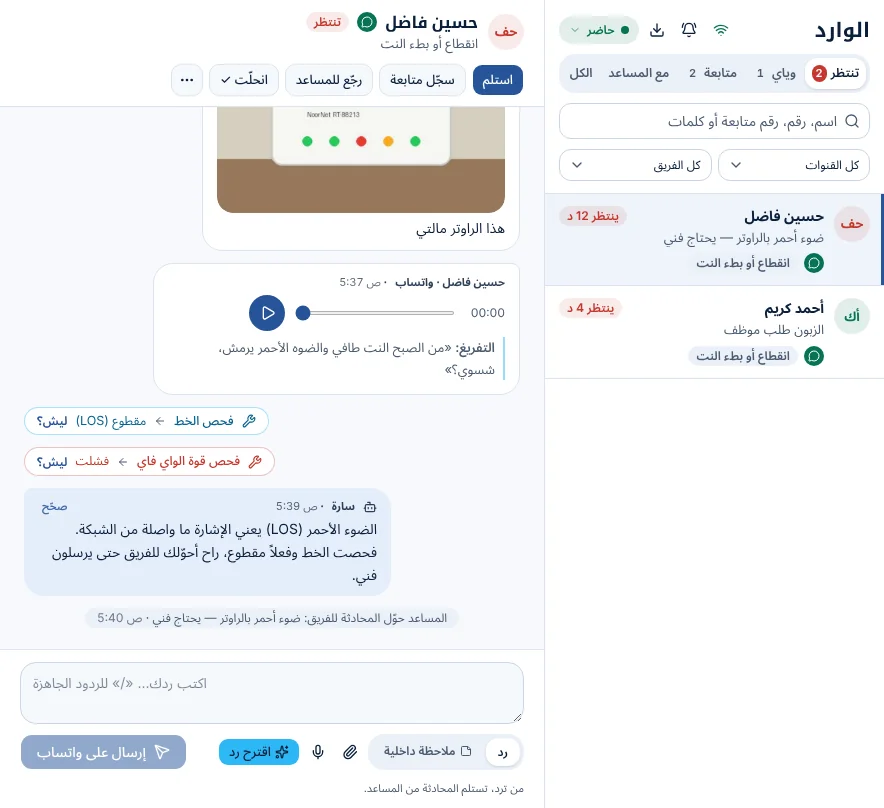
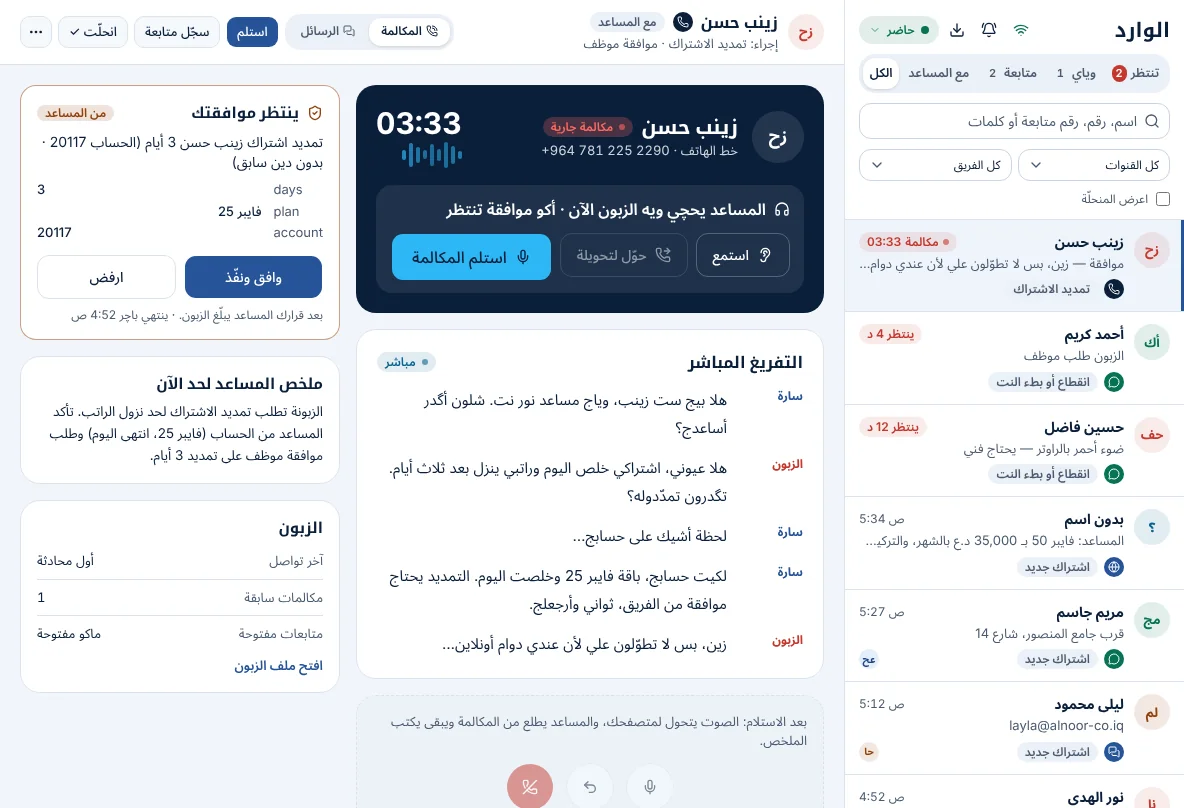
Every conversation and call in one inbox. The assistant hands over with a short summary when it should; your team takes over, replies on the customer's channel, and hands back.
Take over in one tap; the assistant stops answering that customer
Follow-ups with a number and a due time
Correct an answer — the correction becomes guidance
Calls
Answers the phone, too
Connect your PBX over SIP and the assistant answers live calls in the voice and dialect you choose, with the same knowledge and tools. Customers can also call from WhatsApp, your website or your app.
Transfers a call to the right extension
Your team can listen live and take over the call
Every call is transcribed and kept with the customer
Test & publish
Test it before customers see it
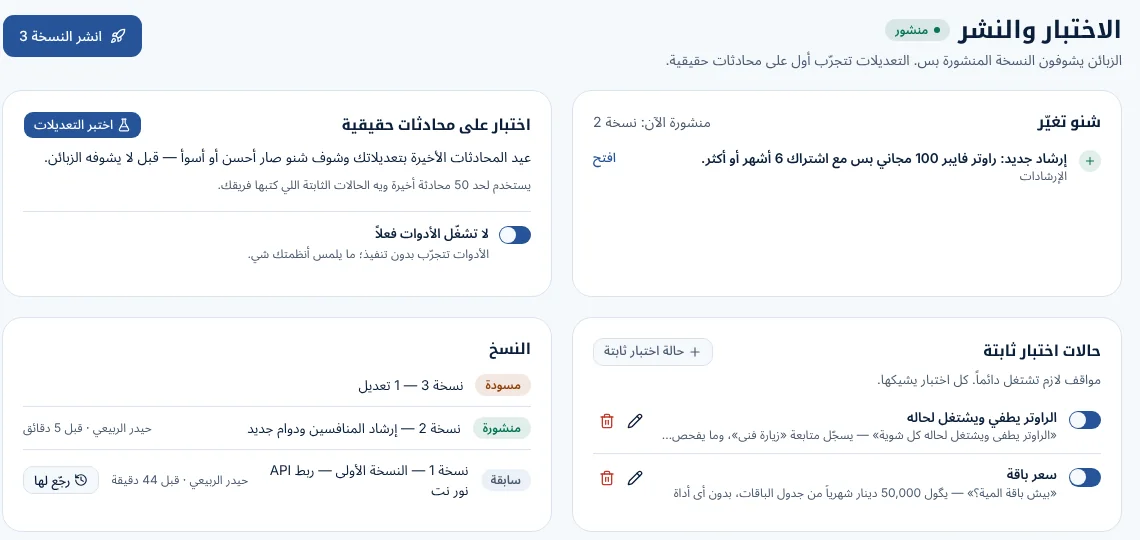
Changes are tested on your real past conversations and on cases your team writes. You see what got better or worse, then publish a version you can always go back to.
What changed since the last version, in plain words
Fixed test cases for the answers that matter most
One click to restore an earlier version
See the product
Persona and guidance
A procedure
Start in three steps
1
Create your business
Sign up with your name, phone and email and choose what your business does. Your free trial starts at once.
2
Teach your assistant
Start from the template for your activity, then add your prices, documents and procedures — or let it read your website.
3
Connect your channels
Put the chat on your website, connect WhatsApp and your pages, test it on your past conversations, and publish.
Simple monthly prices
Every plan starts with a 14-day free trial. Pay monthly by ZainCash, FIB, Qi Card or bank transfer.
Need more replies, minutes or team members? Contact us.
Questions we hear
Does it answer in our dialect?+
Yes. You choose the language and dialect of your assistant, and it understands customers who write or send voice notes in theirs.
What if it doesn't know the answer?+
You decide: it asks the customer a question and then hands the conversation to your team, hands it over at once, or records a follow-up for later.
Can it see our live prices and stock?+
Yes, through a data table you keep up to date, a Google Sheet, or a tool connected to your own system (Opus ERP, Odoo, an MCP server or your API).
Can my team step in?+
Always. Your team sees every conversation in one inbox and can take over at any moment; the assistant stops answering that customer until they hand it back.
Is our data safe?+
Each business's data is kept apart in the database, secrets such as channel tokens are encrypted, connections are encrypted, and the system is backed up every night.
How do I pay?+
By ZainCash, FIB, Qi Card, bank transfer or cash. You get an invoice every month and a reminder on WhatsApp before it is due.